Any organisation with a team · A Squarespace plugin
Team Directory
A searchable staff and volunteer directory you edit like a blog post.
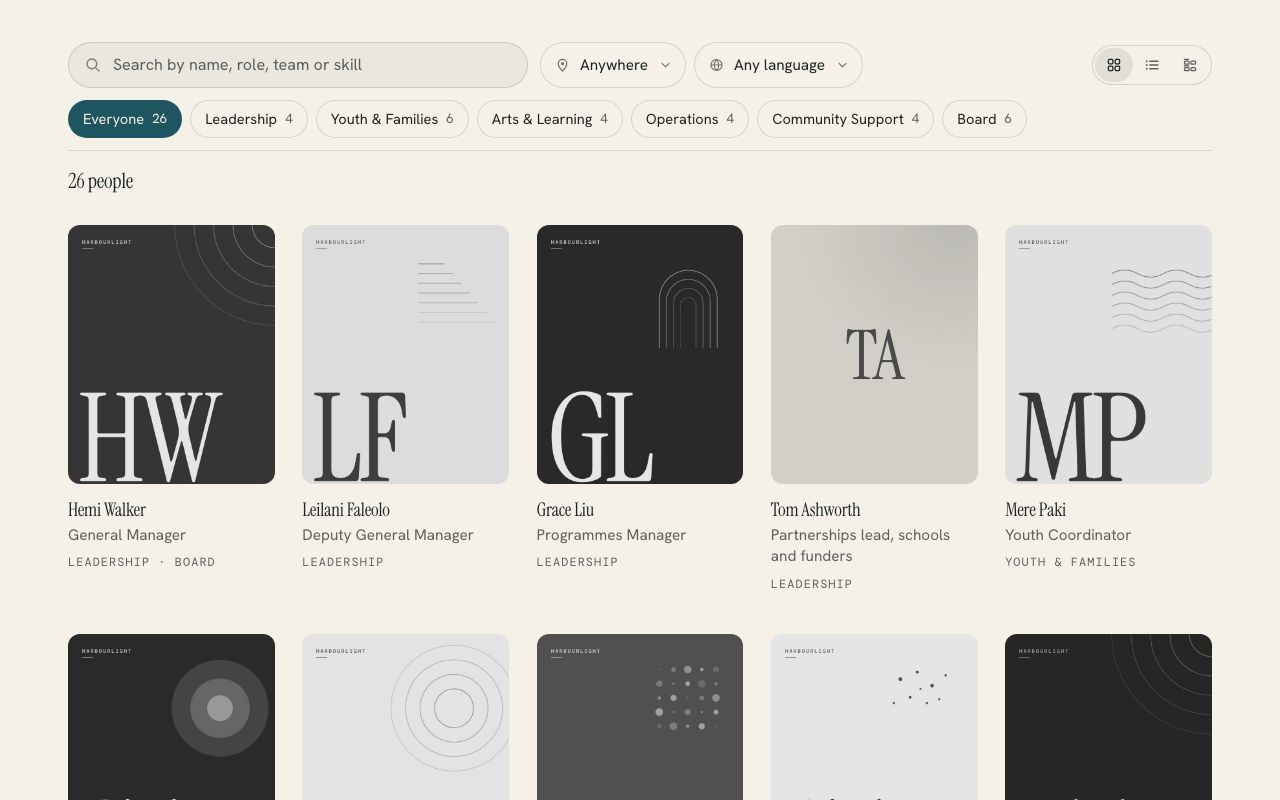
Turns a hidden Squarespace blog with one post per person into a directory people can search and filter by team, place and language. Your staff keep it up to date in the normal editor, and nobody has to touch code after the first paste.
- Edited like any blog post
- Find someone in a few keystrokes
- Filters that read like a sentence
Live demo
Try it on a website that doesn’t exist.
Harbourlight is made up, but the plugin is the real thing, running the way it would on your site. Switch the section colours to see it take on a different look.
On your site it picks up your own fonts, colours and button shape.
Edited like any blog post
Each person is one post. The title is their name, the thumbnail is their photo, categories are their teams and a few labelled lines hold their role, email and phone, so whoever already updates your website can keep it current.
Find someone in a few keystrokes
Search covers names, roles, teams, skills, languages and places, and it doesn’t mind macrons, so “maori” finds te reo Māori speakers. The team buttons show how many people are in each.
Filters that read like a sentence
Pick a team, a location or a language and the line under the search says what’s showing, like “3 people in Youth & Families based in Porirua”. Each part comes off with one click.
Profiles people can act on
Opening someone shows their role, pronouns, teams, the languages they speak, what to ask them about and a short bio, with buttons to email or call them and one that copies their address.
Three ways to browse
A grid of portraits that turn from black and white to colour, a compact list with email and phone buttons, or everyone under their team’s heading. Big teams can add an A to Z bar.
It tells you what’s missing
Add ?team=check to the page address and a panel counts who has a photo, a role and contact details, then names who needs what in plain English. Notes in [square brackets] stay hidden from visitors.
Install
One paste and about ten minutes.
The download includes a step-by-step guide written for whoever looks after your website. Read it before you buy.
Make a blog for your people (it can stay out of your menus) and add one post per person.
Add a Code block to your team page and paste in the file from the download.
Change /team-members to your blog’s address, save, and look at the live page.
What you need: A Squarespace 7.0 or 7.1 site on a plan that runs JavaScript (Core, Plus or Advanced, or Business and Commerce on older plans), and a public blog to hold your people. The blog can be hidden from your navigation and from search engines.
Pricing
Paid for once, and yours to keep.
A single payment with every 1.x update included. The unlimited licence is for designers and agencies who build sites for clients.
Single site
$39USD, once
For one website.
- Use it on every page of one site
- All 1.x updates by email
- Install guide and email help
- Email me if it’s not working on your site
Unlimited sites
$99USD, once
For designers and agencies.
- Use it on as many sites as you build or look after
- Clients keep it when your work ends
- All 1.x updates by email
- Email me if it’s not working on a site
Want all 6? The whole library is US$129 for one site, which is US$85 less than buying them one at a time. Prefer it done for you? I’ll install and set up any plugin on your site for US$79, including tagging a first batch of content so it looks full on day one.
See the bundlePrices are in US dollars. Checkout shows your local currency and adds any tax that applies where you are.
Questions
The questions people ask first.
Do I have to rebuild my team page?
No. The directory goes in a Code block on whichever page you like, and the people live in a separate blog that can stay out of your menus. If you already keep staff bios as blog posts, it can read those.
Will it work on my plan?
If your plan runs JavaScript, yes. That’s Core, Plus and Advanced on the current plans, and Business, Commerce Basic and Commerce Advanced on older ones. The Basic and Personal plans block custom scripts. It works on Squarespace 7.0 and 7.1.
What if some people don’t have a photo or a role yet?
They still show. People without a photo get a monogram of their initials, and the role line is simply left out. The setup check names who’s missing what, so you can fill the gaps when you have time.
Can a page show just one team?
Yes. data-start="Board" opens the directory on the Board, and visitors can still press Everyone. You can also link straight to a team or a person from a newsletter, for example ?team=t/youth-families.
Does it look like my site?
It takes your fonts, colours and button shape from the section it sits in, light or dark, so it looks like part of the page. Every label can be changed too, including into te reo Māori.
Is anyone’s information sent anywhere?
No. It reads your own public blog and keeps a copy in each visitor’s browser. There’s no outside server and no tracking, and it only shows what you’ve already published in those posts.
More plugins