Any organisation with things to share · A Squarespace plugin
Resource Library
A searchable library of downloads, guides and videos, from one blog.
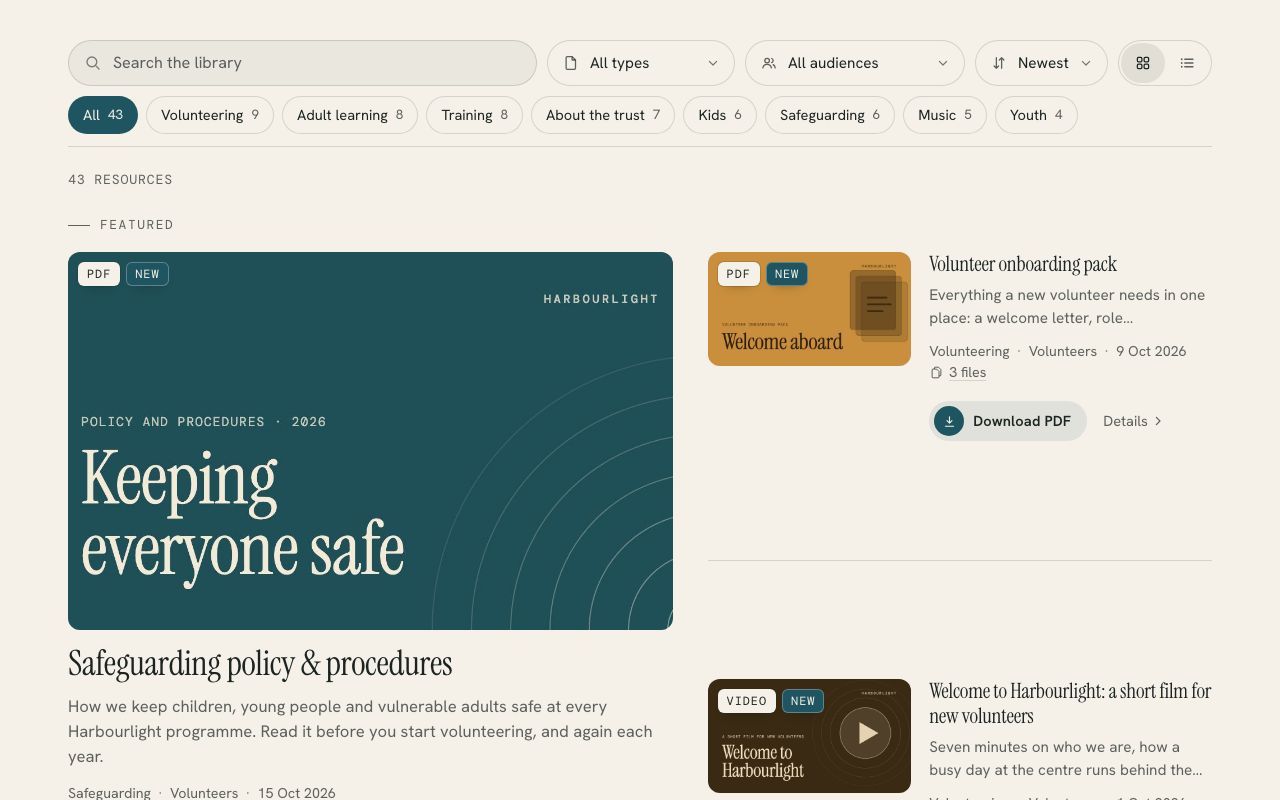
Turns a Squarespace blog into a resource library with topic chips, type and audience filters, search and a download button on every card. Write one post per resource and paste one block.
- One post per resource
- The right button on every card
- Filters that keep up
Live demo
Try it on a website that doesn’t exist.
Harbourlight is made up, but the plugin is the real thing, running the way it would on your site. Switch the section colours to see it take on a different look.
On your site it picks up your own fonts, colours and button shape.
One post per resource
Each blog post becomes a card. Categories and tags become topics, and tags like “Audience: Youth leaders” or “Type: Policy” add an audience filter and your own types.
The right button on every card
The library finds the file or link in each post (a Squarespace upload, Google Drive, Dropbox, OneDrive, YouTube and more) and labels the button to match: Download PDF, Open spreadsheet, Watch video.
Filters that keep up
Search, topic chips with live counts, type and audience filters, three sorts and a grid or list view, all in a bar that floats under your header as people scroll.
Links you can share
Every view has its own address, so a button in your newsletter can open the library on safeguarding forms or the youth leaders’ resources, and Back still works.
Looks like your site
It takes your fonts, colours and button shape, works in light and dark sections, and draws a tidy placeholder in your accent colour for anything without a picture.
A setup check that tells you what to fix
Add ?lib=check to the page address and you get the counts and a short list of plain-English tips, such as which resources have no file or link yet.
Install
One paste and about ten minutes.
The download includes a step-by-step guide written for whoever looks after your website. Read it before you buy.
Add a Code block to the page where the library should go.
Paste the contents of paste-into-code-block.html into it.
Change /resources to the address of the blog that holds your resources, save, and view the live page.
What you need: A Squarespace 7.0 or 7.1 site on a plan that runs JavaScript (Core, Plus or Advanced, or the older Business and Commerce plans), and a public blog with one post per resource.
Pricing
Paid for once, and yours to keep.
A single payment with every 1.x update included. The unlimited licence is for designers and agencies who build sites for clients.
Single site
$39USD, once
For one website.
- Use it on every page of one site
- All 1.x updates by email
- Install guide and email help
- Email me if it’s not working on your site
Unlimited sites
$99USD, once
For designers and agencies.
- Use it on as many sites as you build or look after
- Clients keep it when your work ends
- All 1.x updates by email
- Email me if it’s not working on a site
Want all 6? The whole library is US$129 for one site, which is US$85 less than buying them one at a time. Prefer it done for you? I’ll install and set up any plugin on your site for US$79, including tagging a first batch of content so it looks full on day one.
See the bundlePrices are in US dollars. Checkout shows your local currency and adds any tax that applies where you are.
Questions
The questions people ask first.
Do I have to rebuild my resources page?
Probably not. If your resources are already blog posts, the library reads what’s there: titles, thumbnails, excerpts, categories, tags and the links in each post. The setup check shows what it found and what would make it better.
Where should the files live?
Anywhere your posts can link to. Files uploaded to Squarespace download straight from the card, and Google Drive, Dropbox, OneDrive and SharePoint links open in a new tab. YouTube and Vimeo videos get a Watch button.
What if a post has lots of files?
A card with two to four files shows “3 files” and opens a list of them. With five or more, the main button opens the list, since downloading whichever file comes first wouldn’t help anyone.
How many resources can it handle?
I’ve tested it on a live news library of 145 posts. The first page of cards shows within about a second, the whole library had loaded in under five seconds on a first visit, and returning visitors get it in a fraction of a second, because the library keeps a copy in their browser and checks it with one request.
Can I change the words?
Yes. Every label can be changed with a few lines above the paste, which also covers other languages. The install guide lists them all.
Does it work on the Basic or Personal plan?
No. Those plans don’t run custom scripts. You need Core, Plus or Advanced, or one of the older Business or Commerce plans.
More plugins