Charities, schools and anyone running an appeal · A Squarespace plugin
Giving Kit
Appeal progress, gift levels and a pledge calculator for Squarespace.
Show what you’ve raised as a bar or a thermometer, offer gift levels, and let people work out a pledge and what it really costs after tax. It’s one paste into a Code block, set up with a few numbers.
- Progress that counts up
- What a gift really costs
- Pledges over time
Live demo
Try it on a website that doesn’t exist.
Harbourlight is made up, but the plugin is the real thing, running the way it would on your site. Switch the section colours to see it take on a different look.
On your site it picks up your own fonts, colours and button shape.
Progress that counts up
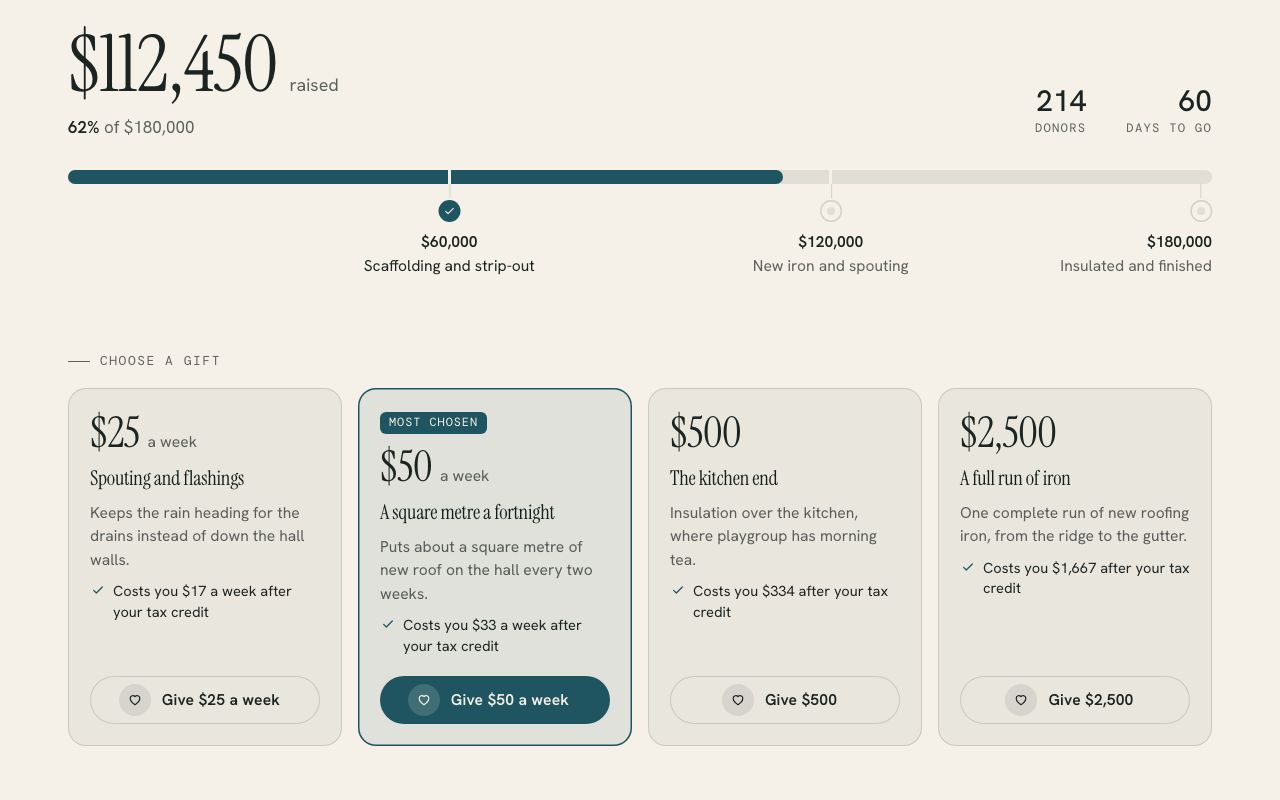
The total, the percentage of your goal, donors and days to go, as a bar or a thermometer. It counts up once when someone first scrolls to it, fills in each milestone as the total passes it, and says Goal reached when you get there.
What a gift really costs
Turn on New Zealand’s donation tax credit and the calculator shows the third people get back and their real cost, using the same maths I built for the Peniel Trust Growth Fund. UK Gift Aid and Australian deductions are there too.
Pledges over time
One-off, weekly, fortnightly, monthly or yearly gifts over as many years as you allow, added up, with lines like “54 square metres of new roof” so people can picture what their gift does.
Gift levels with Give buttons
Cards for suggested gifts, with the one most people choose marked. Each button goes to your giving page with its own amount and frequency filled in, if your page can use them.
Live numbers from a sheet
Point it at a published Google Sheet and the total updates without anyone touching the website. If the sheet can’t be read, it quietly shows the numbers on the page instead.
Looks like your site
It takes your fonts, colours and button shape from the section it sits in, so it fits light, dark and coloured sections. A setup check at ?give=check explains anything that needs fixing in plain English.
Install
One paste and about ten minutes.
The download includes a step-by-step guide written for whoever looks after your website. Read it before you buy.
Add a Code block where you want the appeal and paste in the one file from the download.
Change the goal, the amount raised, the currency and your giving link on the first line, and add milestones or gift levels if you want them.
Open the live page with ?give=check on the end to see what Giving Kit found and anything worth fixing.
What you need: A Squarespace plan that runs JavaScript (Core, Plus or Advanced, or Business and Commerce on older plans), on version 7.0 or 7.1, and a page where people can give, such as a Squarespace donation page or Givealittle.
Pricing
Paid for once, and yours to keep.
A single payment with every 1.x update included. The unlimited licence is for designers and agencies who build sites for clients.
Single site
$29USD, once
For one website.
- Use it on every page of one site
- All 1.x updates by email
- Install guide and email help
- Email me if it’s not working on your site
Unlimited sites
$79USD, once
For designers and agencies.
- Use it on as many sites as you build or look after
- Clients keep it when your work ends
- All 1.x updates by email
- Email me if it’s not working on a site
Want all 6? The whole library is US$129 for one site, which is US$85 less than buying them one at a time. Prefer it done for you? I’ll install and set up any plugin on your site for US$79, including tagging a first batch of content so it looks full on day one.
See the bundlePrices are in US dollars. Checkout shows your local currency and adds any tax that applies where you are.
Questions
The questions people ask first.
Does Giving Kit take the money?
No. It sends people to the giving page you already use, such as a Squarespace donation page, Givealittle, PayPal or Stripe, with the amount and frequency in the link when that page can read them. The money side stays exactly where it is now.
Which tax rules does it know?
New Zealand’s donation tax credit (a third back on gifts of $5 or more), UK Gift Aid (25% more to the charity) and Australian deductions (with an estimate at the donor’s tax rate, labelled as one). It shows none unless you turn one on, and the small print under the calculator says what the figures depend on.
Can the total update by itself?
Yes, from a Google Sheet published to the web as CSV, with rows for raised, goal and donors. Google can take a few minutes to refresh a published sheet, and if it can’t be read Giving Kit uses the numbers on the page, so the appeal never shows an error.
Can I show just a thermometer?
Yes. Each block can be the full appeal, the progress bar or thermometer, the calculator or the gift levels, and you can have several on one page, such as a thermometer at the top and a calculator further down.
What happens when we pass our goal?
The bar stays full, a Goal reached badge appears and the percentage keeps counting, so it might say 112%. The setup check mentions it in case you’d like to raise the goal.
Can I link straight to a suggested pledge?
Yes. Adding ?give=50-weekly-3y to the page address opens the calculator at $50 a week for three years, which is handy in a newsletter or an email to regular givers.
More plugins